
Using the SIC24 with Digitrax's Block Detectors and Signals
BDL168 Block Detector
The Digitrax BDL168 block detector is directly compatible with the SIC24 using LocoNet®. The SIC24 responses to the occupancy messages the BDL168 sends. The factory setting of the BDL168 is for blocks 1 to 16. When block 1 is occupied a sensor message is sent indicated occupied. When unoccupied it sends another message indicating unoccupied. This is the case for each block.
The factory setting for the SIC24 is for blocks 1 to 4. When the BDL168 and SIC24 are connected via LocoNet®, the SIC24 outputs will respond to any of blocks 1 to 4 that the BDL168 is detecting. The first 4 inputs of the SIC24 will send occupancy messages for blocks 1 to 4 respectively. The SIC24 and BDL168 will work in this arrangement without any programming.
BD4 Block Detector
The BD4 is a Digitrax block occupancy detector that was designed to work in conjunction with their DS54 or their SE8c. It was not designed to be a stand alone unit. When a block connected to a BD4 input becomes occupied, the respective output turns on causing a voltage to be applied to that output. When the block becauses unoccupied the output tuns off and the voltage drops to zero because of the connection to a DS54 or SE8c. The inputs on these devises have a pull down resistor that loads the output of the BD4. This resistor in conjunction with a capacitor on the BD4 output provides a delay. This delay is the time from when the block become unoccupied until the BD4 output turns off. They also provide the ground or reference point the DB4 requires to operate.
The input of a Team Digital SIC24 does not have a pull down resistor nor does it provide the required reference point. Therefore, in order for the BD4 to operate with a SIC24 an interface is required. The best approach is to provide an isolated interface since the BD4 is powered from the track.
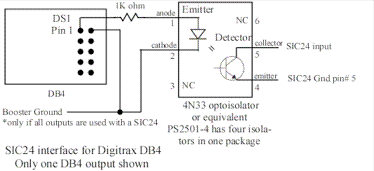
The diagram below shows connections for one type of optoisolator. If all BD4 outputs are used with a SIC24 an IC with four isolators could be used. The reference point or ground of the BD4 is on pins 2, 4, 6 and 8 of the DS1 10 pin connector. One of these pins needs to be connected to the booster ground or LocoNet® (Digirax system) ground. The BD4 outputs are on pins 1, 3, 5, and 7. An output is connected to the emitter diode anode of the optoisolator through a resistor. The emitter diode cathode is connected to one of the BD4 reference point pins. The optoisolator collector is connected to a SIC24 input. The optoisolator emitter (not to be confused with the emitter diode) is connected to the SIC24 ground.
If the BD4 is used in conjunction with a DS54 and a SIC24, the BD4 reference should be connected to the DS54 ground as described in the BD4 manual.
The diagram shows a 1K (one thousand ohm) resistor connected to the emitter diode anode. The value of this resistor effects the length of the BD4 turn off delay. The higher the value the longer the delay. However, if the value is too high the optoisolator will not work correctly. A 1K resistor provides a very short delay. Depending on the optoisolator you use, you may need to experiment with the resistor value.
SMBK Signal
The SMBK can not be plugged directing into a SIC24 connector. However, with some changes it should work OK. Notice the diagram on the front of the SIC24 shows the LEDs (diodes) in the same direction (common anode) as the SMBK manual. The SMBK manual shows 100 ohm LED current limiting resistors. These are to low for the SIC24. A resistor value of at least 330 ohms needs to be added to each SIC24 output. Also a Team Digital TSA could be used.
The connections between the SMBK and the SIC24 are as follows.
SMBK pin# > SIC24 pin# (outputs 1 to 8 )
1 > 6
4 > 1
6 > 2
8 > 3
7 > 4
5 > 7
3 > 8
This will cause the SMBK aspects to function like the block 1 signals in the SIC24 factory setting. When experimenting with the SIC24, simulate blocks 1 and/or 2 to be occupied by grounding inputs 1 and/or 2 of the SIC24.