SMD82 - Switch Machine Driver Application Information
Solenoid Type Switch Machines:
The following switch machines have been tested:
- Atlas HO snap
- NJI
- Peco PL-10 "black"
- Peco PL-11
- Rix Twin Coil
- Kato N unitrack - requires two external resistors
- Hammat & Morgan Twin Coil
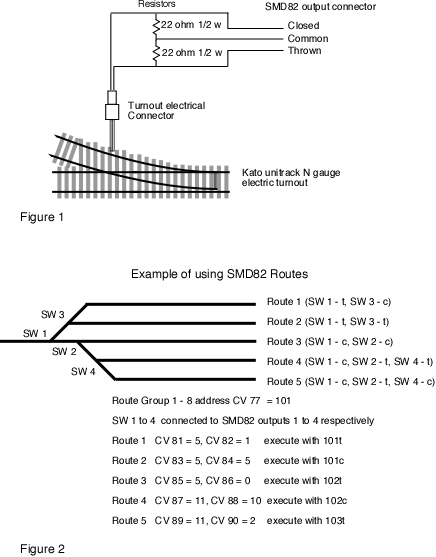
The Kato unitrack electric turnout is a special case since it only has two electrical connections as compared to three for the others. The SMD82 provides power on the common connection, so two resistors are required from the common to power the machine. Figure 1 below shows how the resistors are electrically connected. The SMD82 output configuration must be set to solenoid type operation for proper operation. Warning:This is not guaranteed to work.
Most solenoid type machines require a large pulse of power. The design intent of the SMD82 was to have enough power to be able to activate "snap" any HO/N scale solenoid type switch machine even when they were some what "sluggish".
There are several factors that can contribute to poor "sluggish" performance. A few include electrical connections at the driver and the machine, size and length of wire used for connection and mechanical linkage from machine to switch. If you are having problems check these areas.
The SMD82 uses screw type terminal connectors for connecting to the switch machines. Wire size recommendations are as follows: If you use the 26 gauge wire try to keep the wire length to each switch machine to under 12 feet. With 24 gauge you should stay under 18 feet. With larger size wire you can have longer wire lengths.
Slow Motion "Stall" Type Switch Machines:
The following switch machine have been tested:
- Tortoise™
Caution: Slow motion does not necessarily mean stall. A stall motor means it can stall (stop moving with power applied) and not draw a lot of current. The Tortoise™ is sort of the "standard".
Current Budget:
The SMD82 current numbers based on a track voltage of 14.5 volts. They are typical values and will vary with track voltage.
Solenoid operation:
Static state or idle: 13 to 15 ma
Solenoid activated: Pulse to charge CDU starts at 300 ma and rapidly (exponential charge of about 3 seconds) reduces to static level.
Tortoise™ operation with 8 connected:
Static state or idle: Output configuration (CV value = 1) ; 320 ma
Tortoise™ activated: Output configuration (CV value = 1) : slightly less than 320 ma while Tortoise™ is moving
Static state or idle: Output configuration (CV value = 2) : 13 to 15 ma
Tortoise™ activated: Output configuration (CV value = 2) : 50 to 52 ma while one Tortoise™ is active (time set with CV2)
Route Features:
The internal route feature of the SMD82 is well suited for controlling yard switching. With a single switch command up to eight switches can be controlled at a time. Up to 16 individual routes can be configured, so there is a wide range of combinations available. See figure 2 for an example of route usage in a yard.
Local Input:
The SMD82 has a number of inputs for local control. You can connect push buttons or toggles switches to control the outputs in a variety of ways. The routes shown in the example in figure 2 could be controlled by push buttons as well from the throttle.
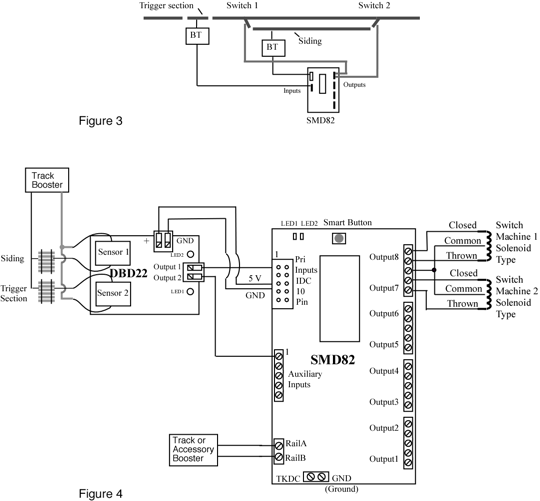
You can connect our DBD22 block occupancy detector to the SMD82 inputs to provide some unique capabilities. Figure 3 shows a diagram of how the SMD82 could be used to control siding switches (turnouts). Using primary input 1 and auxiliary input 1 a conditional route can be set up were auxiliary input 1 is dependent on the state of primary input 1. When a train is in a siding and another train crosses the trigger section, the two switches can be correctly aligned. If the siding is not occupied the trigger section has no effect. Figure 4 shows a more detailed diagram for connecting the DBD22 and SMD82.
The primary input connector is a 10 pin flat ribbon cable (IDC) type. If you prefer screw type connectors you can use the TSA.
Using the SMD82 without track power:
The SMD82 requires track power (DCC packets) connected to the Rail A and Rail B terminals for remote control and for programming via the main track or programming track. However, once programmed, operation via inputs is possible without connection to the track. In this case only the inputs will control the outputs.
If you are using the SMD82 to drive tortoise type switch machines then 12 volts DC will work. If you are using it to drive solenoid switch machines then use 9 volts AC. Don't use 12 volts AC or you may over stress the SMD82.
The capacitor discharge unit requires AC voltage to obtain the correct power for solenoid switch machines. Track power (DCC) is a type of AC with a peak of about 14 volts for HO scale. 9 volts AC has a peak of about 14 volts so it is about equivalent to the track voltage.
The TKDC (rectified track voltage) and GND terminals are available for powering external loads. These terminals could be used for powering the SMD82 but there is really no reason for doing so.
SMD82 Known Problems:
10/21/06:
Various outputs are closed or thrown after 'power on' even though option 1 or 2 has not been set. This problem is caused by any of the inputs being configurated as active with a 'low to high' transition or a 'on change' transition. When configurated as active with a 'high to low' transition this problem does not occur.
SMD82s with this problem can be identified by a single silver mark (1) on the integrated circuit (IC). For solution to the problem contact us.
5/1/07:
Push buttons or other devices connected to inputs respond intermittently or not at all. This problem is caused by loco addresses 111 to 127 confusing the SMD82. The work around is to use long addresses for any loco requiring an address in that range.