SRC16 - Switch & Route Controller Application Information
General Information:
The SRC16 can be used in a number of applications. Track plan panels, Centralized Traffic Control (CTC) panels, fascia boards, motor drive, switch position reporting (feedback) and DCC to serial bus (LocoNet®) gateway are some types of uses for the SRC16.
The SRC16 can be power from the track voltage or a DC power supply (9.5 to 12 volts).The power supply connector is non polarized. When a DC power supply is used, either terminal can be connected to plus or minus of the power supply. When multiple SRC16s are used they can be all connected to one power supply. The power supply must be able to supply the current for all the SRC16s. The plus and minus of the power supply must be connected to the same power input terminal on each SRC16.
Be sure the power supply you use puts out the correct filtered DC voltage when connected to the SRC16. Most analog 'Power Packs' will not work because they do not provide smooth (filtered) DC power. Also it must be isolated from the system ground. That is, the power supply can not have one of it's outputs connected to ground (booster ground, loconet ground, house wiring ground, etc). Some wall transformers have a ground connection. Three prongs into the wall suggests the negative output of the power supply is grounded.
The SRC16 has a connector for Railsync. Railsync wires in a 6 wire cable can be used to power other devices when an accessory bus is used. In a Digitrax system railsync power is used to power throttles and does not have enough power to power SRC16s. In a Digitrax system railsync CAN NOT be connected to track power.
The minimum LED current limiting resistor value is 470 ohms. This is a general guide line for a typical LED. Resistor values of 1K work well with many LEDs. The higher the resistance value, the lower the power supply requirements.
In the examples below only switch group 1 is shown being used. However, any group could be used and not all the groups have to be configured the same.
LED connections:
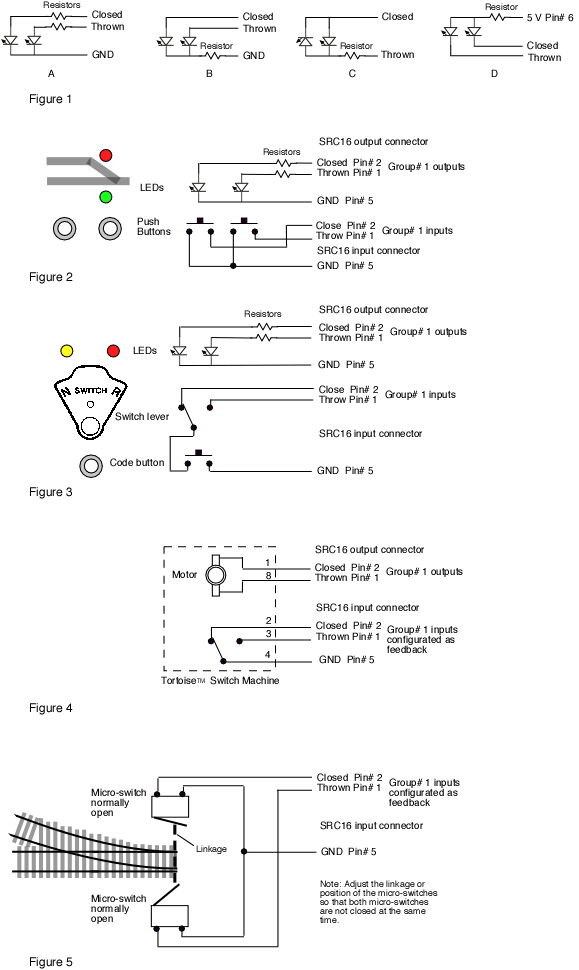
Figure 1 below shows three different configurations in which LEDs and the associated resistors could be connected to a SRC16 group output. In normal operation where only one of the group LEDs is turned on at a time, all three configuration work OK. However, during lamp check at power on and in "Smart Programming" mode when both LEDs are turned on, both LEDs in configuration Figure 1B may not be on and both LEDs in Figure 1C will be off.
Note that the LED configuration in Figure 1A can also represent a three legged bi-color LED (common cathode). While the configuration in 1C can represent two legged bi-color LEDs. Figure 1D can represent a three legged bi-color LED (common anode).
Track Plan Panel:
Figure 2 below shows how push buttons and LEDs can be connected to the SRC16 inputs and outputs. In this case, when a button is pressed, the LEDs show the state of the switch on a representation of the track plan. The push buttons could be located near the LEDs or some distance away on another panel.
The buttons could also be placed on a fascia board without the use of the LEDs to provide local control of a switch or a route.
CTC Panel:
Figure 3 below shows a CTC panel with a US&S configuration. The switch lever can be moved freely at any time. However, nothing happens until the button (sometimes called "code start button") is pressed. Once the button is pressed, the LEDs indicate the state of the switch.
Switch Machine Drive:
Figure 4 below shows how a Tortoise™ switch machine can be connected to the SRC16 outputs. The SRC16 has been tested with the Tortoise™ switch machine and can drive up to eight of them. Programming is the same whether using a switch machine or LEDs. The SRC16 is NOT compatible with the SwitchMaster, Scale Shops, Switch Tender, Cobalt or Fulgurex motors. Note: 1/22/15 the Cobalt iP Analog has a much lower current requirement and should work oK.
Each switch machine is connected to one of the SRC16 group outputs. One of the motor terminals is connected to the closed (green LED) output and the other motor terminal is connected to the thrown (red LED) output. When the SRC16 receives a switch command for that group, lets say a close command, 5 volts is applied to the closed output. The thrown output is at ground, so 5 volts is applied to the motor. It then moves in the close direction. Likewise, when a throw command is received for that group, 5 volts is applied to the thrown output. The closed output is now at ground, so 5 volts is applied to the motor in the opposite direction. Consequently, it moves in the throw direction.
Since the SRC16 uses 5 volts for motor drive, the switch machine moves slower than if 12 volts were applied.
The inputs can be used to control the switch machine or can be configured as feedback as discussed next.
LEDs can be used as switch position indicators. The SRC16 does not have enough voltage output to drive a Tortoise™ in series with an LED. However, you can drive a Tortoise™ in parallel with a LED resistor combination (in this case the resistor should be at least 1000 ohms). You can also use the internal contacts of the Tortoise with a LED resistor combination powered by 5 volts from the SRC16 or by track voltage.
Switch Machine Drive with MotoD:
To drive Tortoise™ with a higher voltage and thus at a faster speed MotoDs can be used. To adjust the speed of the Tortoise™ a series resistor can be used. See the SRC16 manual. It is recommend to connect all the Tortoise™ and verify they are all working before experimenting with a resistor value. Assuming the SRC16 is powered from track voltage of 14 volts, there will be a little over 12 volts applied the the Tortoise™ . With 16 Tortoise™ connected, a 10 ohm resistor will drop the voltage about 2 to 3 volts (slightly slower). A 39 ohm resistor will drop the voltage about 4 to 5 volts (noticeable slower). The resistor power rating should be 1 watt.
Switch Position Reporting:
The SRC16 can be used to report switch position which is sometimes called switch position feedback. In some situations it is desirable to know for sure that a switch actually moved when it was commanded. Figure 4 below shows the SRC16 inputs connected to the Tortoise™ switch machine internal contacts. Figure 5 below depicts micro switches mechanically linked to the switch and connected to the SRC16 inputs. When the switch moves internal contacts close or a micro switch is activated, grounding a SRC16 input. The SRC16 then sends a serial bus message.
Connector information:
Jameco : http://www.jameco.com
mating connector part # - 138376
10' flat ribbon cable, gray part # - 643794
10' flat ribbon cable, multicolor part # - 639672
connector installation tool part# - 73252